

You fixed LCP, your PageSpeed score finally went green, and yet something still feels off; pages that load fast but feel sluggish, buttons that don’t react for half a second, text that jumps out from under your finger right as you tap it. That’s the other two Core Web Vitals: INP and CLS. Nobody writes about them because LCP screenshots look better, but Google grades all three.
INP: your page’s reaction time
Interaction to Next Paint replaced the older FID metric in March 2024, and it measures something users complain about far more than load speed: when I tap this, how long until something visibly happens? The threshold is 200 milliseconds for a “good” score, and it’s assessed across all interactions on the page: taps, clicks, key presses.
The tell-tale symptom of bad INP is the “dead tap”: you press a menu button, nothing happens, you press again (now it’s registered twice), and a moment later the page lurches. Mobile users describe this as “the site is broken.” Google describes it as a failed vital.
What actually causes bad INP
INP problems come from long tasks; chunks of JavaScript that monopolize the browser’s main thread for 300, 500, 1,000 milliseconds while it works, unable to respond to anything. The usual suspects on a WordPress site:
- Third-party scripts. Chat widgets, heatmap trackers, and ad scripts are the top offenders. Every one of them runs code on your page. Audit them quarterly and delete anything you stopped noticing; the user never noticed it either, except when it ate their tap.
- Everything-at-once hydration. Heavy sliders, mega-menus, and popup plugins that initialize on page load instead of when scrolled into view.
- Delay, don’t disable. The fix is rarely removing functionality; it’s deferring scripts until after the first paint, and splitting long tasks so the browser can squeeze interactions between them.
CLS: the metric that measures betrayal
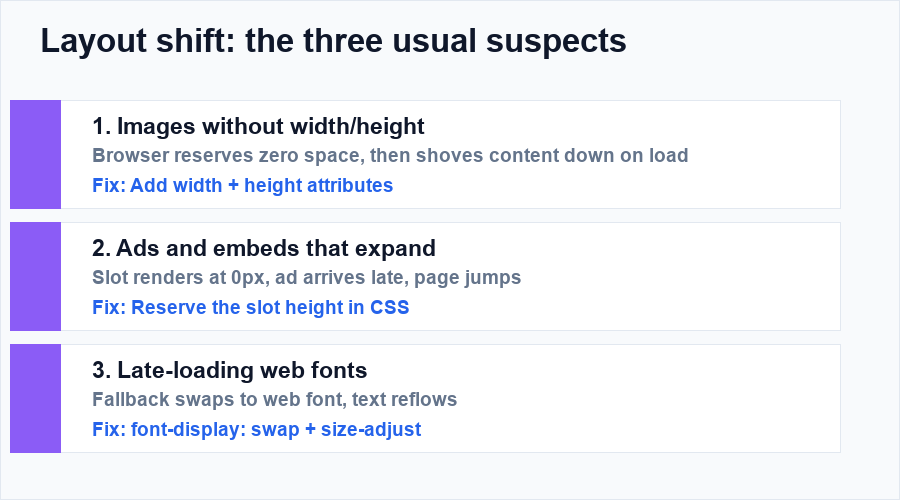
Cumulative Layout Shift scores how much the page jumps while loading. The threshold is 0.1, and the classic violations are all familiar: you’re about to tap “read more” and an ad loads above it, so you tap the ad instead. Google has graded this for years because it’s the most rage-inducing experience on the mobile web.
The three causes, in order of how often they’re guilty:
- Images without dimensions. If the HTML doesn’t declare
widthandheight(or an aspect-ratio), the browser reserves zero space, then shoves everything down when the image arrives. WordPress adds dimensions automatically for images in the content, but not always for lazy-loaded banners or slideshows added by plugins. - Ads and embeds without reserved space. An ad slot that renders at 0px and expands later is a layout-shift machine. Reserve the slot’s height in CSS before the ad loads.
- Late-loading fonts. The swap from fallback font to web font reflows the text.
font-display: swapfixes the invisible-text problem; size-adjust fine-tunes the jump.
How to test both properly
PageSpeed Insights reports field data (real Chrome users, 28-day window) for both metrics; that’s the number Google grades, so start there. For debugging, the Performance panel in Chrome DevTools records a session and highlights long tasks (INP culprits), while the Layout Shift regions overlay shows you exactly which element jumped and when. The Web Vitals extension gives you all three metrics live while you browse your own site.
One warning: lab tools run on fast desktop hardware. Your INP problem lives on the mid-range Android phone your reader holds in one hand on a train. Test on a real one.
The order of operations
Fix images and layout shift first (CLS is usually an afternoon), then hunt long tasks for INP (usually a weekend of third-party pruning). LCP already has its own guide, how to fix a bad LCP score; and the full optimization workflow lives in the WordPress speed guide. All three green, and “fast site” stops being something you hope for and starts being something you can see.
Three INP myths worth retiring
- “My hosting is slow, that’s the INP problem.” Hosting affects load; INP is browser-side JavaScript execution after load. A dedicated server with a bloated chat widget still fails INP.
- “Images cause it.” Images affect LCP and CLS. INP is interaction handling; its suspects are scripts and long tasks.
- “Green lab score means I’m fine.” Lab tools test one interaction on fast hardware. INP is graded on your worst meaningful interactions across real users; the popup, the mega-menu, the third-party form. Field data is the truth here.
Frequently Asked Questions
Do I need to rewrite my site for INP?
Almost never. Most WordPress sites fix INP by pruning third-party scripts, deferring what remains, and replacing one heavy plugin; weekend of subtraction, not a rebuild.
What’s a quick CLS win while I’m at it?
Add width and height attributes to every image and reserve fixed heights for ad slots and embeds. Those two habits clear most layout-shift failures in an afternoon.
Keep going: load speed is the first vital; start with how to fix a bad LCP score; and the caching, CDN and hosting decisions behind all three are covered in the WordPress speed guide.