
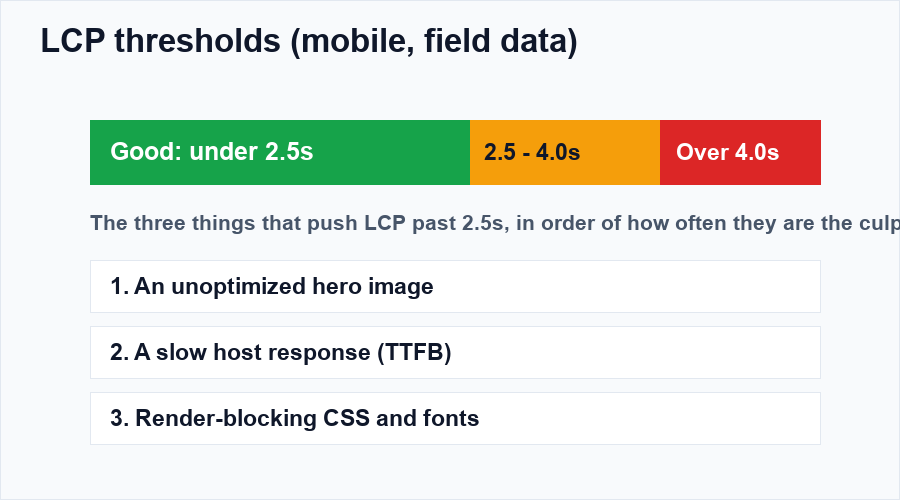
PageSpeed Insights gave you 96 on desktop and 54 on mobile, and the culprit list starts with three letters: LCP. Before you install another optimization plugin, it helps to know that the overwhelming majority of bad LCP scores come from the same three causes, and none of them is fixed by a caching plugin alone.
What LCP actually measures
Largest Contentful Paint is the moment the biggest visible element finishes rendering; usually your hero image, a featured-image banner, or the headline block. That’s why “site speed” is a misleading phrase: your page can be fully interactive long before LCP happens, because LCP waits for one specific element.
So the first job is finding out which element it is. PageSpeed Insights names it in the diagnostics; URL, an image, sometimes a text block. Every fix below assumes you know your LCP element. If you don’t, that’s step zero.
Cause 1: The hero image (the usual suspect)
On WordPress blogs, the LCP element is the featured image more often than not. Fixing it is free:
- Resize before uploading. A 4,000-pixel photo displayed at 800px wide is five times the bytes for zero benefit. 1,200px wide is plenty for a full-width blog image.
- Serve it as WebP. 30-50% smaller at identical quality. Every mainstream optimization plugin converts automatically now.
- Never lazy-load it.
loading="lazy"on the LCP image is the single most common self-inflicted wound; you’re telling the browser to delay the exact thing LCP measures. Lazy-load everything below the fold, eager-load the hero. - Prioritize it.
fetchpriority="high"on the hero image tells the browser “download this first, everything else can wait.” One attribute, often worth several tenths of a second.
Cause 2: A slow server response
If the browser waits 1.5 seconds just to receive the HTML, no image trick will save your score. TTFB (time to first byte) over ~800ms means hosting or caching problems:
- Page caching; the server should serve pre-built HTML, not rebuild the page for every visitor. One caching plugin, properly configured, is all you need.
- The host itself. If TTFB stays slow with caching on, the host is the problem. No plugin fixes an overloaded server; this is the one issue that genuinely requires spending money, and it’s usually the cheapest real fix available.
Cause 3: Render-blocking CSS and fonts
The browser won’t paint anything until blocking CSS downloads, so a heavy stylesheet delays LCP even when the image is ready:
- Minify and defer non-critical CSS (your caching plugin does both).
- Self-host fonts with
font-display: swap; text renders immediately in a fallback font, then swaps. Killing render-blocking Google Fonts requests alone has rescued many scores. - Limit font families and weights. Two families, four files, done.
How to know it actually worked
Lab scores update instantly but are simulations. Real users feed the Chrome User Experience Report (the “field data” section on PageSpeed Insights) over a rolling 28-day window. That’s what Google’s ranking systems evaluate, and it’s why your score won’t move the day after your fix. Give field data two to four weeks, and meanwhile check that the fix shows up consistently in lab tests on mobile.
The order that saves you a weekend
Fix the hero image first (30 minutes, biggest win), then caching and TTFB, then fonts and CSS. Re-test after each step instead of all at once, otherwise you’ll never know what actually moved the needle. And when you’re done with LCP, the other two vitals are waiting: INP and CLS, the vitals everyone ignores, plus the full WordPress speed optimization guide.
Mobile LCP is a different sport
Your desktop score can be glorious while mobile field data stays red, for reasons that only exist on phones: mid-range Android CPUs render and execute JavaScript several times slower, mobile networks re-negotiate connections, and caches that hit on desktop often miss on mobile. Test on a real mid-range phone, on cellular, with the page cached cold. If you only optimize against a desktop lab score, you are optimizing for the minority of your traffic.
Fixes that quietly backfire
- Lazy-loading everything. The hero must be eager. Lazy-load below the fold only; the LCP element is the one exception.
- Stacking optimization plugins. Two caching plugins, an image compressor, and a minifier fighting each other produce double-cached HTML and broken styles. One well-configured stack beats five overlapping ones.
- Chasing 100 instead of 95. The last five points often cost a weekend each and change nothing users can feel. Green Core Web Vitals is the finish line.
Does LCP affect rankings directly?
It’s one of several page-experience signals; tiebreaker among pages of similar content quality, not a substitute for it. The practical framing: great content with red vitals leaves ranking wins on the table; green vitals make sure nothing technical is holding your content back. Fix it once, monitor quarterly, and move on to writing.
Keep going: LCP is one of three vitals; the other two are in INP and CLS, the vitals everyone ignores, and the full optimization workflow lives in the WordPress speed guide.